CER Checker (Figma Plugin)
A self-serve compliance tool that validates designs against Common Experience Requirements directly in Figma—reducing review bottlenecks, repeated rework, and late-stage blockers, while helping teams learn the CERs through use.
Context
Common Experience (CE) relied on a set of roughly 140 requirements that teams were expected to apply during day-to-day delivery.
At the same time, CE reviews regularly surfaced low-level issues—contrast, typography, detached components, link styling—creating a loop where Designers weren’t consistently doing the checks upfront, and bar raisers were spending time on fixes that could have been self-served.
Problem
CE reviews were intended to be scheduled as needed, but two things were happening at once:
- Reviews weren’t consistently being scheduled, so compliance gaps were slipping through until late in the process.
- When reviews did happen, they were often dominated by repeatable, “mechanical” issues (contrast, typography, system adherence) that slowed everyone down.
So what
A large requirements set lived in a document, but real learning happens through repetition in the work. Without a practical, in-tool way to validate designs, compliance was inconsistent, rework increased, and issues became ship blockers downstream.
Approach
Meet Designers where they work
I designed the CER Checker as a Figma plugin so compliance could happen in the same moment decisions are made, not later in a review meeting. The goal was to shift behavior from reactive fixes after feedback to habitual checks while building.
Turn requirements into repeatable checks
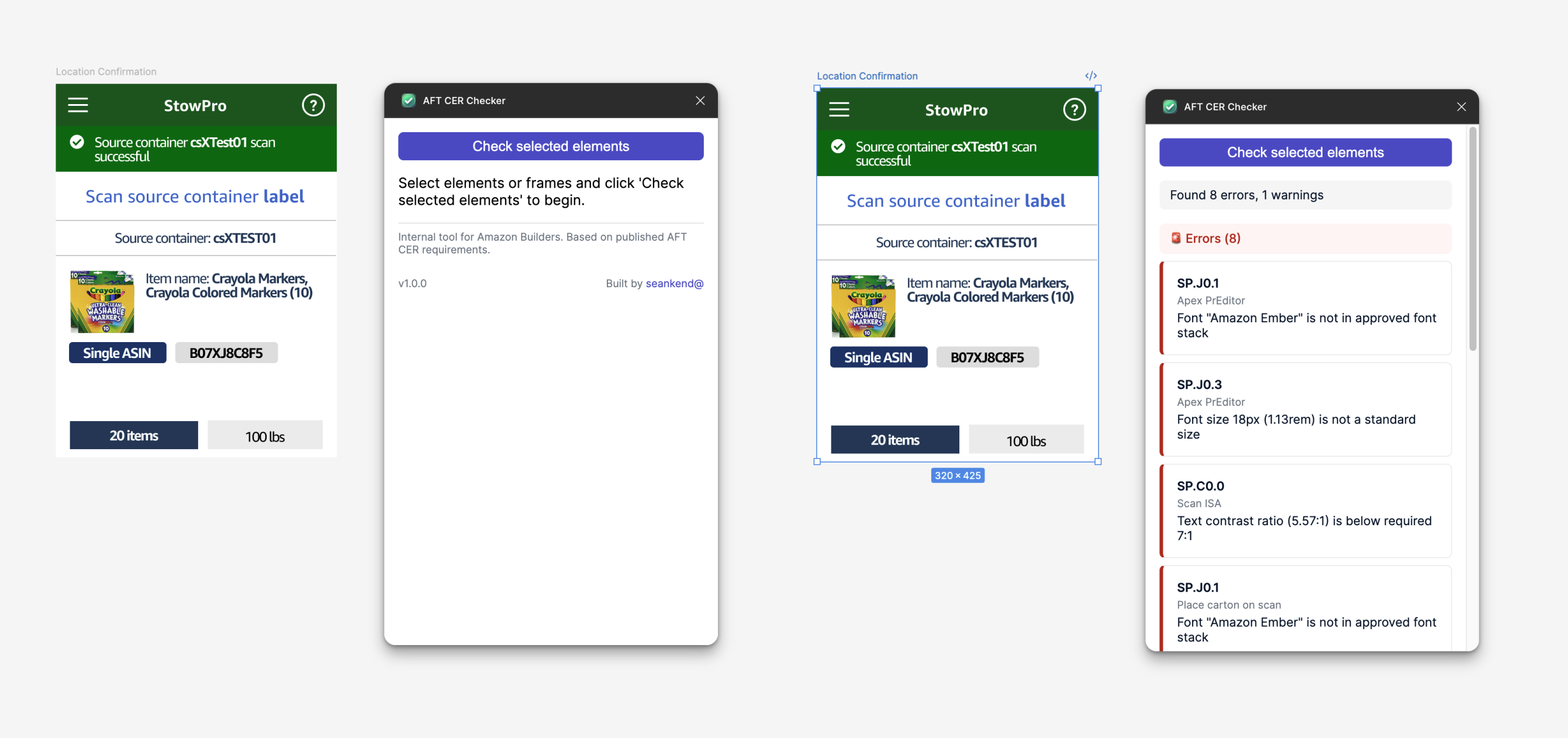
The plugin translates common CER categories into automated validation rules, with clear output that references the CER rule area (e.g., type, contrast, text usage, link styling) and explains what to change.
- Typography checks (font stack, sizes, line height guidance)
- Text standards (case usage, multiline alignment)
- Visual standards (contrast thresholds, border radius, disabled states)
- Link conventions (underlines, external-link expectations)
- Component health (detached component detection with false-positive prevention)
How I built it
This was my first end-to-end build using an AI-assisted workflow. I used Roo Code to accelerate implementation against Figma’s Plugin API while owning the product decisions, validation logic, and quality bar.
From concept to production-ready plugin, I shipped an initial version in under 24 hours, then iterated on reliability, edge cases, and scale constraints to support real-world files.
Technical challenges I solved (with Roo)
- Figma node traversal: evolved from manual selection checks to full-frame scanning, so designers could validate meaningful sections of work quickly.
- Scale + safety limits: added pragmatic constraints (e.g., node limits / batching) to keep runs stable on large files.
- Detached component detection: tuned logic to reduce false positives and avoid flagging legitimate component structures.
Outcomes
- Created a self-serve compliance mechanism for Designers—reducing repeated “low-level” feedback loops in CE reviews
- Helped teams catch issues earlier (contrast, typography, adherence), reducing downstream rework and late-stage blockers
- Increased practical learning of CERs through habitual use, not document referencing
- Maintained momentum during a critical period when the other CE bar raiser was on leave and coverage was limited
- Proved a new working model: shipping a useful internal tool without needing a full product team
Reflection
This reinforced a simple point: quality doesn’t scale through meetings—it scales through tooling that makes the right behavior the easy behavior. The CER Checker turned standards into repeatable checks, reduced review churn, and helped teams ship with fewer late-stage surprises.
Building the CER Checker was my turning point into UX engineering and agentic workflows—showing me I can take an idea from concept to production-ready delivery quickly, then maintain and evolve it over time.